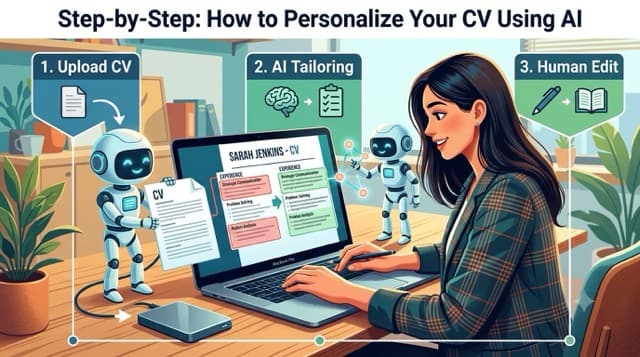
Step-by-Step: How to Personalize Your CV Using AI
Table of Contents
Artificial intelligence can dramatically improve your CV—but only if you use it strategically. Many job seekers make the mistake of asking AI to “write me a resume” and then submitting the output with minimal editing. While this may save time, it often results in a generic CV that fails to reflect your unique experience or stand out to recruiters.
Instead, think of AI as a career coach, editor, and brainstorming partner. It can help you identify gaps, improve your wording, and tailor your CV to each job while ensuring the final document still sounds like you.
Follow these five steps to create a personalized, ATS-friendly CV that feels authentic and professional.
Step 1: Start with Your Existing CV
Your current CV should always be the foundation. Even if it’s outdated, it contains the facts about your education, work history, certifications, skills, and achievements that AI needs to produce useful suggestions.
Avoid asking AI to create a CV from scratch unless you have no existing document. AI doesn’t know your career history unless you provide it, and asking it to “fill in the blanks” increases the risk of inaccuracies or fabricated content.
Why This Matters
Recruiters value authenticity. If your CV includes responsibilities or achievements you can’t explain during an interview, your credibility can quickly suffer.
Instead, upload or paste your existing CV and ask AI to improve it.
Example Prompt
“Here’s my current CV. Improve the wording, remove repetition, and make it more professional without changing the facts or adding experience I don’t have.”
This tells AI to act as an editor rather than a writer.
What AI Can Help With
- Correct grammar and spelling
- Improve sentence structure
- Strengthen action verbs
- Remove unnecessary words
- Enhance readability
- Organize information more effectively
What You Should Still Do
- Verify every statement for accuracy.
- Ensure dates, job titles, and achievements are correct.
- Remove any suggestions that don’t accurately represent your experience.
Step 2: Copy the Job Description
One of the biggest mistakes job seekers make is sending the same CV to every employer.
Hiring managers are looking for candidates whose experience aligns with the specific role they’re trying to fill. A customized CV immediately demonstrates that you’ve taken the time to understand the position and highlight your most relevant qualifications.
AI makes this process much faster.
Simply copy the job description and provide it alongside your CV.
Example Prompt
“Compare my CV with this job description. Identify the skills, keywords, and experiences that match, and recommend improvements without changing my actual experience.”
AI will often identify:
- Important technical skills
- Required certifications
- Frequently used keywords
- Preferred qualifications
- Desired soft skills
You can then update your CV to better reflect your existing experience.
Example
Suppose a job description emphasizes:
- Technical SEO
- Google Analytics 4 (GA4)
- Content Strategy
- Team Leadership
- Data Analysis
If you’ve already worked with these tools or responsibilities, AI may recommend moving them higher in your CV or rewriting your experience to make them more visible.
Instead of:
Worked on SEO projects.
You could write:
Planned and executed technical SEO strategies using Google Analytics 4, keyword research, and on-page optimization to improve organic search performance.
The experience hasn’t changed—it’s simply communicated more effectively.
Step 3: Ask AI to Match Your Experience to the Role
Once AI has compared your CV with the job description, ask it to suggest improvements that emphasize the most relevant aspects of your experience.
This isn’t about rewriting your career history. It’s about highlighting the experiences that matter most for a particular position.
Example Prompt
“Based on this job description, rewrite my work experience to emphasize the skills most relevant to the role while keeping everything truthful.”
This helps AI prioritize the right information.
Example Before
SEO Specialist
- Managed websites.
- Conducted keyword research.
- Worked with content teams.
- Produced monthly reports.
Example After
SEO Specialist
- Led technical SEO initiatives that improved website crawlability and search visibility.
- Conducted keyword research to identify high-value content opportunities.
- Collaborated with writers and developers to optimize on-page content and site performance.
- Produced monthly performance reports using Google Analytics and Search Console, providing actionable recommendations for growth.
Notice that the second version is more detailed, more relevant, and easier for recruiters to understand.
Step 4: Rewrite AI Suggestions in Your Own Voice
This is where many people go wrong.
AI-generated content often sounds polished—but it doesn’t always sound like a real person.
After receiving AI’s suggestions, spend time editing the wording so it reflects your natural communication style.
Remove Generic Phrases
AI frequently uses expressions like:
- Results-driven professional
- Highly motivated individual
- Proven ability
- Dynamic leader
- Passionate about excellence
These phrases appear on thousands of CVs and rarely add value.
Replace them with specific information.
Instead of:
Results-driven professional with outstanding communication skills.
Write:
Marketing Coordinator with four years of experience managing email campaigns and social media content for retail brands.
Specific beats generic every time.
Read It Out Loud
One of the easiest ways to identify robotic language is to read your CV aloud.
Ask yourself:
- Would I actually say this in an interview?
- Does this sound like something I’ve written before?
- Does it accurately reflect my experience?
If the answer is “no,” rewrite it.
Step 5: Add Numbers and Achievements
Recruiters don’t just want to know what you were responsible for—they want to know what you accomplished.
AI can remind you to include measurable achievements, but only you know the actual results of your work.
Weak Example
Managed social media accounts.
Better Example
Managed social media campaigns across Facebook, Instagram, and LinkedIn, increasing audience engagement by 48% over nine months.
Weak Example
Responsible for SEO.
Better Example
Improved organic traffic by 120% within ten months through technical SEO audits, content optimization, and internal linking improvements.
Weak Example
Assisted customers.
Better Example
Assisted more than 60 customers daily while maintaining a customer satisfaction rating above 95%.
Numbers immediately make your accomplishments more credible.
Whenever possible, include:
- Percentages
- Revenue
- Cost savings
- Time saved
- Team size
- Customer satisfaction
- Sales growth
- Website traffic
- Conversion rates
- Project budgets
Even approximate figures are often better than none, provided they’re honest and reasonable.
Best AI Prompts for CV Personalization
The quality of AI’s output depends heavily on the prompts you provide. Clear, specific instructions lead to more useful results.
Here are some practical prompts you can use to improve different sections of your CV.
Improve My Professional Summary
Rewrite my professional summary so it sounds confident, natural, and relevant to this job without exaggerating my experience.
Match My CV to a Job Description
Compare my CV with this job description and suggest improvements that highlight my relevant skills without adding false information.
Improve Achievement Statements
Rewrite these responsibilities as achievement-focused bullet points using measurable results where appropriate.
Make My CV ATS-Friendly
Review my CV for ATS compatibility and recommend keyword improvements while keeping the language natural.
Remove Repetition
Identify repetitive phrases in my CV and replace them with stronger alternatives.
Strengthen My Action Verbs
Replace weak action verbs with stronger alternatives that accurately describe my experience.
Improve Readability
Simplify this section so it’s easier to read while remaining professional.
Identify Missing Skills
Based on this job description, identify relevant skills I may already have but haven’t clearly highlighted in my CV.
Improve My Work Experience
Rewrite my work experience using concise, achievement-focused bullet points without changing the facts.
Final Quality Check
Review my entire CV as if you were a recruiter. Identify anything that sounds generic, repetitive, unrealistic, or AI-generated.
This final review often catches issues that earlier prompts miss.
Pro Tips for Getting Better AI Results
To get the most value from AI, follow these best practices:
- Give AI plenty of context about your experience.
- Share the full job description rather than just the job title.
- Tell AI not to invent qualifications or achievements.
- Ask for multiple versions of important sections so you can choose the best one.
- Always review every suggestion before adding it to your CV.
- Tailor your CV for every application instead of using one generic version.
- Keep your writing concise and avoid unnecessary jargon.
- Remember that AI is an assistant—not the author of your career story.
Key Takeaways
- Start with your existing CV instead of generating one from scratch.
- Use AI to compare your CV with each job description and identify relevant keywords.
- Rewrite AI suggestions so they reflect your natural voice and communication style.
- Replace generic responsibilities with measurable achievements wherever possible.
- Well-crafted prompts help AI produce more accurate, personalized, and recruiter-friendly results.
- Always verify every AI-generated suggestion to ensure it accurately represents your experience.
Next up in Part 3: We’ll cover The most common mistakes that make AI-written CVs sound robotic, how to keep your resume authentic, the best AI tools for CV writing, frequently asked questions, and a strong conclusion to tie everything together.

Written by
Jason
Jason is a Web Technology Specialist specializing in SEO and content-driven digital platforms. He is the founder of GraduatesHub.co.za, where he publishes research-backed guides on free online courses, career development, and in-demand skills. In addition to GraduatesHub, Jason has worked on multiple SEO-focused web projects, gaining hands-on experience in content strategy, search optimization, and scaling organic traffic. His work centers on analysing online learning platforms such as Alison and Coursera, and helping users identify practical, career-relevant opportunities. His insights are based on direct platform testing, market research, and continuous monitoring of digital education trends.
Build Your Proof of Work Portfolio
Put reading into practice: complete graded portfolio tasks across IT, Web Dev, Data Analysis, Marketing, and Finance.
Not sure what to do with these courses?
Use our free AI career tools to review your CV, prep for interviews, identify skill gaps, and build a personalised learning roadmap.
Related Articles
Oct 25, 2026
Free CDC and NIH Public Health Certificates for Healthcare and NGO Workers (2026 Guide)
Discover how to earn free public health certificates, CEUs, and bioethics credentials from the CDC and NIH in 2026. Perf...
Read Article →
Oct 25, 2026
SBA Learning Center vs. FAI: Free Government Business and Contracting Courses (2026/27)
Compare free business, finance, and government contracting courses with certificates from the U.S. Small Business Admini...
Read Article →
Oct 25, 2026
CISA Learning (Formerly FedVTE): Free Government Cybersecurity Training Guide (2026)
Learn how to access free government cybersecurity courses and certificates on CISA Learning (formerly FedVTE) in 2026. E...
Read Article →